The whole drawing set on one desk.Measured, marked up and tracked.
DraftPlanar opens construction PDFs side by side on an infinite canvas, on Mac and iPad. Take off quantities from the real vector lines, mark up with Apple Pencil, and pin every issue to the spot it belongs. Nothing leaves your device.
- 14-day free trial
- Works offline
- No account
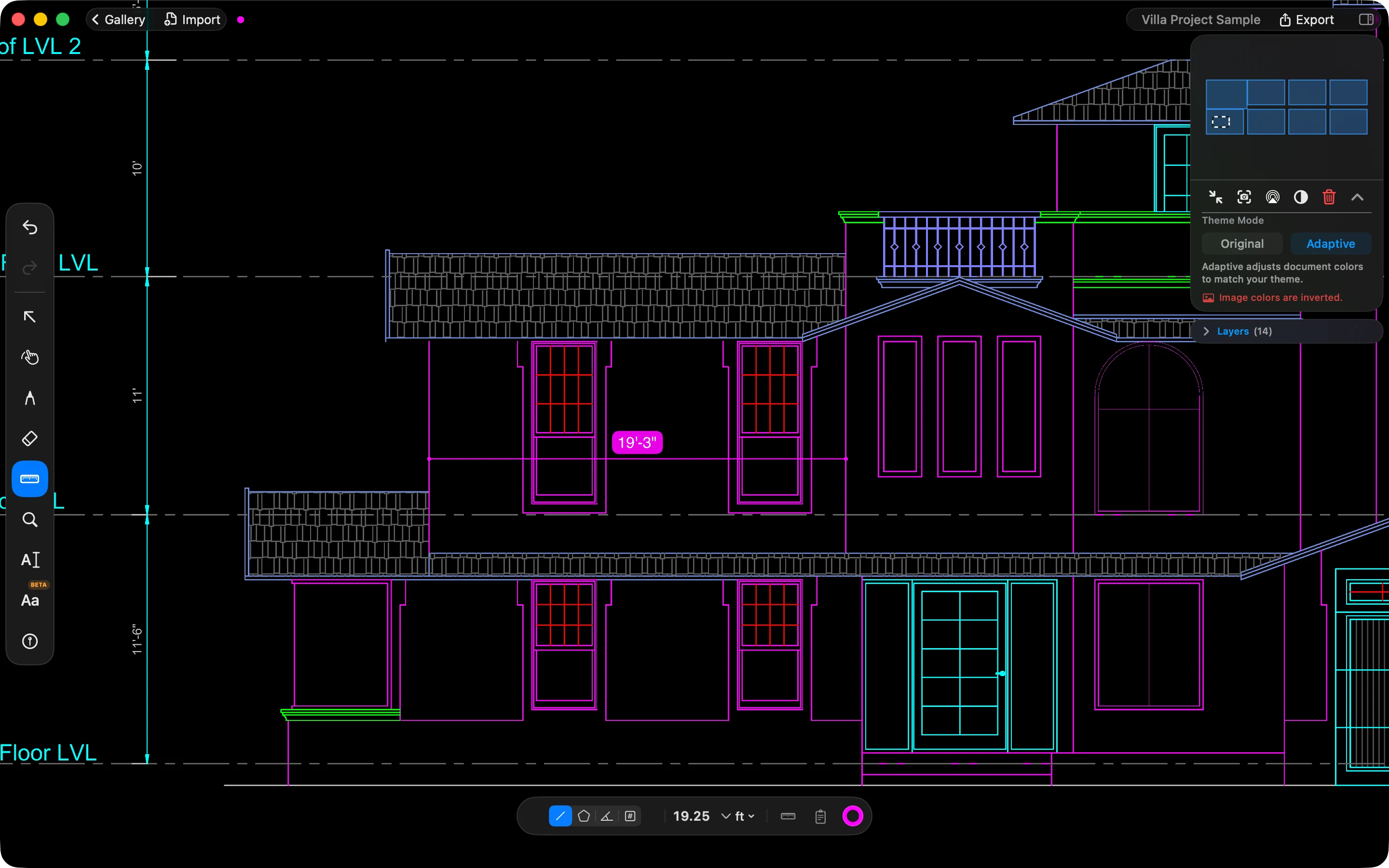
Five regions. Everything else in DraftPlanar lives in one of them.
Mac and iPad
At the desk on Mac. In the field on iPad.
One app, built for each, and one subscription covers Mac, iPad and iPhone.
Mac · at the desk
- Lay the whole set out side by side on a large display.
- A single-letter shortcut for every tool, and ⌘-scroll to zoom at the pointer.
- Precise takeoff with a trackpad or mouse, snapped to the vector lines.
- Present to the room over AirPlay, then export PDFs and punch-list reports.
iPad · in the field
- Mark up with Apple Pencil. The ink is vector, so it stays sharp at any zoom.
- Measure by touch, with a magnifier that shows the exact point under your finger.
- Pin a note where the problem is, with a photo or a voice memo.
- Works with no signal: nothing on the job site depends on a network.
And on iPhone, for a quick look during the walk-through.
New: takeoff
Quantities from the lines the architect drew.
Every point snaps to the PDF’s own vector geometry, not to pixels, and every sheet keeps its own scale.
Length
Place point after point to run a chain. Each segment and the running total update as you go.
Area
Trace a room to get its area and perimeter. Tap the first point again to close it.
Angle
Three points give the angle at the vertex, with an optional 15° snap.
Count
Make a series such as Doors, then tap each one. Numbers and totals carry across sheets.
Scale from the title block
DraftPlanar reads the sheet size and the scale printed in the title block and checks it against dimensions on the drawing, so many sheets are ready to measure without calibrating by hand.
Takeoff list
Every measurement lands in a list docked beside the plan, so totals are one glance away.
Measurements are approximate and depend on the PDF and its scale. Verify critical dimensions before relying on them. Terms
In one line
Four ideas behind every feature.
A drawing isn't a picture. It is hundreds of thousands of precise shapes on one sheet, and DraftPlanar treats it that way.
Fast
GPU rendering at 60 fps, even on 500-page sets.
Why drawing sets make PDF viewers slowPrecise
Real vector geometry. Snap to the line the architect drew.
Spatial
An infinite canvas instead of a page scroller.
Private
On your device, offline, with no account.
Feature Guide
Eight tools. Every shortcut.
The same Feature Guide that ships inside the app: what each tool is for, how to drive it on Mac or iPad, and how experts use it.
Feature 01
SelectionV
Every sheet, image and markup is an object you can arrange.
Shortcuts
| Drag | Box-select on empty canvas |
|---|---|
| Click | Add to or remove from the selection |
| L | Unlock / lock PDFs and images |
| [ | Rotate left |
| ] | Rotate right |
| ] | Bring to front |
| [ | Send to back |
| Delete the selection |
Expert use
- 1Mark up without nudging a sheetSheets start locked, so a box-select picks up only your markups. Press Command-L when you actually mean to rearrange sheets.
- 2Build a review clusterUnlock, drag the plan, section and detail next to each other, then lock again. The layout is saved with the project.
- 3Straighten a sideways scanSelect it and press Command-] until it reads upright. No round trip to another app.
Notes and punch lists
The issue stays with the drawing.
Replace scattered photos and follow-up spreadsheets with notes pinned to the exact place on the plan.
- 01
Pin it
Drop a numbered note on the room, detail or dimension.
- 02
Describe it
Category, priority, status, assignee and due date. Add a photo or a voice memo instead of typing.
- 03
Track it
Filter the list by status or category, and open any note to return to the view where you made it.
- 04
Report it
Export a numbered punch-list PDF with photos and drawing snapshots. Anyone with a PDF viewer can read it.
Also in DraftPlanar
The rest of the review kit.
Compare revisions
Pick two versions of a PDF and DraftPlanar overlays them page by page, so what changed stands out. Export the result.
PDF layers
Turn individual layers on and off, such as architecture, structure or MEP, and filter long layer lists by name.
Adaptive dark mode
Adaptive mode recolours drawings to match your theme, so a white sheet does not glare in a dark room.
Present on a big screen
Show the canvas on a TV or projector over AirPlay, with a pointer so the room sees what you are pointing at.
Export
Export marked-up sheets as PDF, with sharp vector text and your markups in the order you stacked them.
In your language
The app speaks 14 languages, and Chinese, Japanese and Korean input work right on the canvas.
Private by design
Your drawings do not become our data.
No account, no tracking and no cloud upload. Rendering, text recognition, search and measurement all run on your device, and the app works in airplane mode.
Read the privacy policyBring your next plan review into one workspace.
Open the PDFs you already have, keep the whole set in view, and turn every observation into a clear next step.
Every Pro tool is free for 14 days. After that, DraftPlanar Pro is a monthly or annual subscription, and canvases you made stay open to view.